
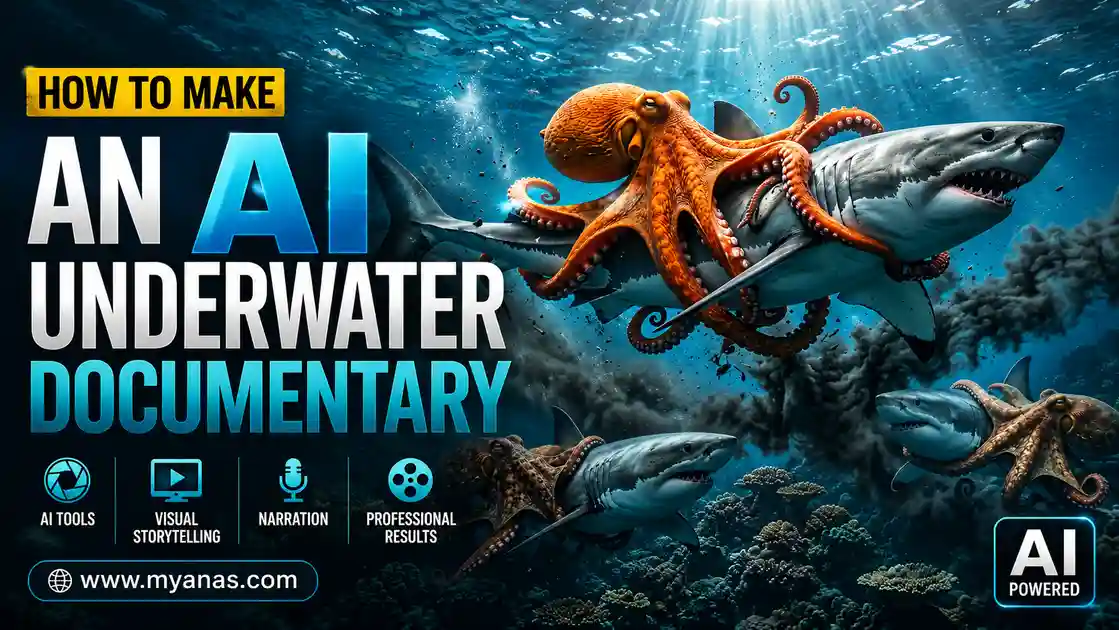

Short deep-ocean clips with enormous creatures and calm, documentary-style narration are a popular fictional format on YouTube Shorts, Reels and TikTok. None of it is real footage: it is generated with AI. This guide explains a step-by-step workflow for building a 24-second clip from three linked 8-second segments, and why you should label it clearly as AI-generated and fictional.
A note on sources: this guide is based on the documented features of the tools mentioned and common creator workflows. Free limits, credit costs, available models and platform monetization rules change often, so check each official page before you rely on any number.
What an “AI underwater documentary” is
It is a short video that uses AI to generate ocean imagery, animate it and add narration, so it looks and sounds like nature-documentary footage. In the workflow below the creatures are deliberately oversized fantasy-scale animals, so the result is fiction. Presenting it as a real discovery would mislead viewers, and it is likely to violate platform rules on synthetic media.
Real deep-sea footage needs expensive equipment and specialist crews. AI removes that barrier, which is why the format is a common starting point for faceless channels. The ocean is also widely described by researchers such as NOAA as largely unexplored, which keeps audiences curious about what could be down there.
Tools you need
| Tool | Role |
|---|---|
| Claude or another chatbot | Concepts and structured prompts |
| Google Flow | Image and video generation; available models, credits and free access change, so check your account |
| CapCut or DaVinci Resolve | Editing, sound and captions |
| ElevenLabs (optional) | AI voiceover if you do not want to record your own |
Set the image aspect ratio to 9:16 from the start, because cropping a landscape image later damages the composition. Model names and their strengths change frequently, so try the options your account currently offers.
READ MORE
Step 1: Generate concepts and prompts with a chatbot
Describe the type of encounter you want, such as a creature-versus-creature scene, a discovery or a survival moment, and ask for several concepts before choosing. Pick the one where you can picture the first frame, the tense middle and the ending. Then ask for one image prompt and three sequential motion prompts. Each motion prompt covers one 8-second clip, so together they make a 24-second sequence with a beginning, middle and end. Each also contains a short narration line, timed to fit inside the clip.
The master prompt
Paste the prompt below into your chatbot. It returns 10 concept ideas; reply with a number and it outputs the image prompt and three motion prompts.
You are a world-class viral AI wildlife documentary creator, marine biologist storyteller, National Geographic visual director, BBC Earth sequence designer, Nano Banana prompt engineer, and Veo 3.1 Fast cinematic wildlife specialist.
Your specialty is creating ultra-realistic Giant Sea Monster Fight documentaries that feel like real National Geographic discoveries.

STEP 1
Generate 10 original viral Giant Sea Monster Fight video ideas.
Requirements
Every idea must be completely unique.
Giant sea monster vs giant sea monster.
Creatures must be scientifically plausible.
Real marine biology only.
Realistic animal behavior only.
Realistic ocean ecosystems only.
No magic. No fantasy. No mythical creatures. No aliens. No supernatural powers. No glowing energy attacks. No cartoon style.

Creature Scale Rules
All animals must be portrayed as extreme prehistoric-scale ocean giants.
Each creature should appear approximately 15-20 times larger than its real-world counterpart.
Examples: Giant Squid = 15-20x normal giant squid size; Sperm Whale = 15-20x normal sperm whale size; Colossal Squid = 15-20x normal colossal squid size; Greenland Shark = 15-20x normal size; Oarfish = 15-20x normal size.
Despite the scale increase: Anatomy must remain realistic. Skin textures must remain realistic. Movement must remain biologically believable. Weight and momentum must feel realistic.

Allowed Environments
Deep ocean trenches, Abyssal plains, Hydrothermal vent fields, Underwater volcanoes, Polar oceans, Open ocean, Continental shelf ecosystems, Deep underwater canyons.

Each Idea Must Include
Monster A, Monster B, Reason for conflict, Environment, Viral Score (1-10)

STEP 2
After the user selects an idea:
Generate ONLY the following:

NANO BANANA 2 IMAGE PROMPT
Requirements: Ultra photorealistic, National Geographic photography quality, BBC Earth realism, Two gigantic sea monsters, Each creature approximately 15-20x larger than real-life size, Massive cinematic scale, Realistic anatomy, Hyper-detailed skin textures, Realistic ocean environment, Dynamic action moment, Consistent creature design, Documentary photography style, Volumetric underwater lighting, Natural water particles, Accurate marine biology, No text, No watermark

VEO 3.1 FAST MOTION PROMPT 1
Purpose: This prompt animates the image prompt into the first 8-second video clip.
Requirements: Same creature design as image prompt, Same environment, Realistic marine behavior, Realistic water physics, Documentary realism, BBC Earth style, National Geographic style, Massive scale, Cinematic camera movement, Ultra detailed, No text on screen, No subtitles, No music, No fantasy effects
Dialogue: Include ONE short National Geographic style narrator line.
Rules: Natural documentary narration, 5-6 seconds long, Suitable for an 8-second clip, Written inside the prompt, Narrator voice only
Example style: "Two ancient giants meet where survival leaves no room for retreat."

VEO 3.1 FAST MOTION PROMPT 2
Purpose: Continue directly from the final frame of Motion Prompt 1.
Requirements: Exact same creature appearance, Exact same environment, Continue battle naturally, Preserve visual continuity, Realistic predator behavior, Escalate tension, Documentary realism, BBC Earth style, National Geographic style
Dialogue: Include ONE short National Geographic style narrator line.
Rules: 5-6 seconds long, Matches the events in Clip 2, Narrator voice only
Example style: "Now the struggle shifts, and neither titan is willing to yield."

VEO 3.1 FAST MOTION PROMPT 3
Purpose: Continue directly from the final frame of Motion Prompt 2.
Requirements: Exact same creatures, Exact same environment, Continue seamlessly from previous clip, Show climax or outcome of battle, Realistic marine behavior, Realistic physics, Documentary realism, BBC Earth style, National Geographic style
Dialogue: Include ONE short National Geographic style narrator line.
Rules: 5-6 seconds long, Matches final battle outcome, Narrator voice only
Example style: "In the abyss, only one giant will emerge as the master of these waters."

IMPORTANT OUTPUT RULES
When the user selects an idea:
Output ONLY: Nano Banana 2 Image Prompt, Veo 3.1 Fast Motion Prompt 1, Veo 3.1 Fast Motion Prompt 2, Veo 3.1 Fast Motion Prompt 3
Do not generate explanations. Do not generate extra text. Do not generate alternative prompts.
Ensure all three motion prompts form one continuous 24-second documentary sequence where each new clip starts exactly from the end frame of the previous clip.
The prompt names specific image and video models. Those names change, so if a model is no longer available, replace it with whichever image and video models you currently use.
Step 2: Generate the base image
Paste the image prompt into Flow’s image mode and set 9:16 before generating. Before accepting a result, check three things: are the creatures clearly separated and positioned for action, does the light look like deep ocean (limited, directional, atmospheric) rather than even studio light, and does the scene have depth cues such as particles and layers. If it fails, adjust the prompt and regenerate. Adding words like “dark blue ocean water” and “visible water particles” can help avoid results that look like sky. A weak base image produces weak motion.
READ MORE
Step 3: Animate clip 1
In Flow’s video mode, upload the image as the starting frame, choose an 8-second duration where available, and paste motion prompt 1. Video generation uses credits, and costs vary by model and change over time, so check the credit cost shown in the tool before you generate. Generating two versions of a clip lets you choose the better one.
Step 4: Use the end-frame technique for clips 2 and 3
To avoid visible jumps between clips, save the very last frame of clip 1 as an image and use it as the starting image for clip 2 with motion prompt 2. Repeat with clip 2’s last frame for clip 3. Because each clip starts where the previous one ended, the subjects and lighting stay consistent and the three clips play as one continuous shot.
READ MORE
Step 5: Add narration, music and sound effects
Import the three clips into your editor in order. Use the narration lines written into the motion prompts, and either record them yourself or use an AI voice tool. Add quiet cinematic ambient music without lyrics, plus underwater ambience and creature movement sounds. Check the license of any music or voice tool you use, and remember that generated video may already contain its own audio.
Step 6: Export, label and post
Export at 720p or higher and upload the same vertical video to the platforms you use. Each platform has its own rules for AI-generated content and for monetization, and both change. Before posting, read the current pages for YouTube Help, TikTok and Facebook, and use each platform’s AI-content label where it applies. Also state plainly in the caption or on screen that the creatures are fictional, so viewers do not mistake the clip for a real discovery.
READ MORE
On earnings: many faceless channels earn little or nothing for months, and income figures vary widely, so treat any promise of fast money with suspicion. Short clips typically pay less than longer videos, so channels often mix short discovery clips with longer edits.
Common mistakes
- Rushing the base image. Flaws in the image carry into the video.
- Skipping the end-frame bridge. Clips will look disconnected.
- No sound design. Silent or flat audio makes the footage feel hollow.
- No AI disclosure. Missing labels can lead to removal or account penalties.
- Presenting fiction as fact. Label the creatures as fictional.
A 30-day practice plan
READ MORE
- Week 1: set up your tools, generate 10 concepts, and make one complete 24-second video without publishing. Note where you got stuck.
- Week 2: make three more videos with different concepts and practice the end-frame technique, then publish your first one.
- Week 3: post consistently and record which concepts get the best watch time. Keep a list of prompts that produced convincing water motion.
- Week 4: repeat what worked, test different narration styles and review your analytics.
FAQ
Do I need filmmaking experience?
No. A chatbot handles concepts and prompts, Flow handles visuals, and a free editor handles assembly. Patience with the image step matters more than technical skill.
How long does one video take?
It depends on your experience and generation wait times. Expect your first few attempts to take noticeably longer than later ones, and note your own time.
Can I monetize this on YouTube?
Monetization depends on the YouTube Partner Program requirements and its policies on repetitive or inauthentic content, both of which change. Read the current YouTube policy and disclose AI-generated content where required.
Which platform should I start with?
The same 9:16 video can be posted to YouTube Shorts, TikTok and Facebook Reels. Start with one, watch your analytics and add others later.
Is the free tier enough?
It is enough to learn the process. Daily credits vary and can limit how much you generate, so check your current allowance.
Can I reuse the prompt for other topics?
Yes. Change the creature and environment rules for space scenes, prehistoric animals or other subjects. The three-part motion structure works for many short narrative videos.
How do I keep it from looking fake?
Focus on image quality, motion prompts that specify realistic water physics, and sound design. If the base image does not look like deep-water photography, animation will not fix it.
What if the chatbot ignores the format?
Ask it to follow the exact output format, or to re-read the instructions and try again.
Wrap-up
The workflow comes down to a strong concept, a careful base image, the end-frame technique between clips, good sound, and honest labeling. Make one clip, label it as AI-generated fiction, and improve with each new one.


Leave a Reply